Quuu Automate transforms your social media presence by curating and scheduling content across Facebook, LinkedIn, and Twitter/X automatically. This tool eliminates hours of manual posting whilst maintaining an authentic brand voice through AI-powered content suggestions and customisable scheduling windows. Within minutes of account setup, you’ll have a fully automated content calendar working to grow your audience.
The platform offers two distinct posting modes. Automatic posting delivers content suggestions directly to your social profiles without manual approval. Manual mode gives you full editorial control before anything goes live.
Social media managers, content marketers, and small business owners use Quuu to maintain consistent online presence. The system curates hand-reviewed articles and generates brand-aligned posts through its AI assistant functionality.
This guide walks through complete Quuu Automate setup. You’ll connect social profiles, configure your brand persona, select content categories, and optimise scheduling windows. By the end, you’ll have automated social media content working whilst you focus on strategy.
What Quuu Automate Actually Does for Your Social Media
Quuu Automate combines content curation with intelligent scheduling. The platform discovers relevant articles, blog posts, and visual content tailored to your chosen topics.
Hand-reviewed content suggestions arrive daily based on your selected categories. Each piece passes through Quuu’s quality filters before appearing in your queue.
The AI assistant generates original social media posts that match your brand voice. It analyses your tone preferences, industry language, and audience expectations to create authentic content.
Automatic posting distributes curated content and AI-generated posts according to your scheduling window. Your social profiles stay active without daily manual intervention.
Three major platforms integrate with Quuu: Facebook, LinkedIn, and Twitter/X. You can connect multiple profiles from each network under a single Quuu account.
Content scheduling adapts to your timezone and optimal posting times. The system learns when your audience engages most actively with different content types.
Real social media users share content promoted through Quuu‘s network. This organic distribution method builds backlinks and expands reach beyond your immediate followers.
Creating Your Quuu Account and Initial Setup
Account creation takes less than three minutes. The setup process gathers essential information about your brand and social media goals.

Starting Your Free Trial
Visit the Quuu website and click the sign-up option. Enter your email address and create a secure password for account access.
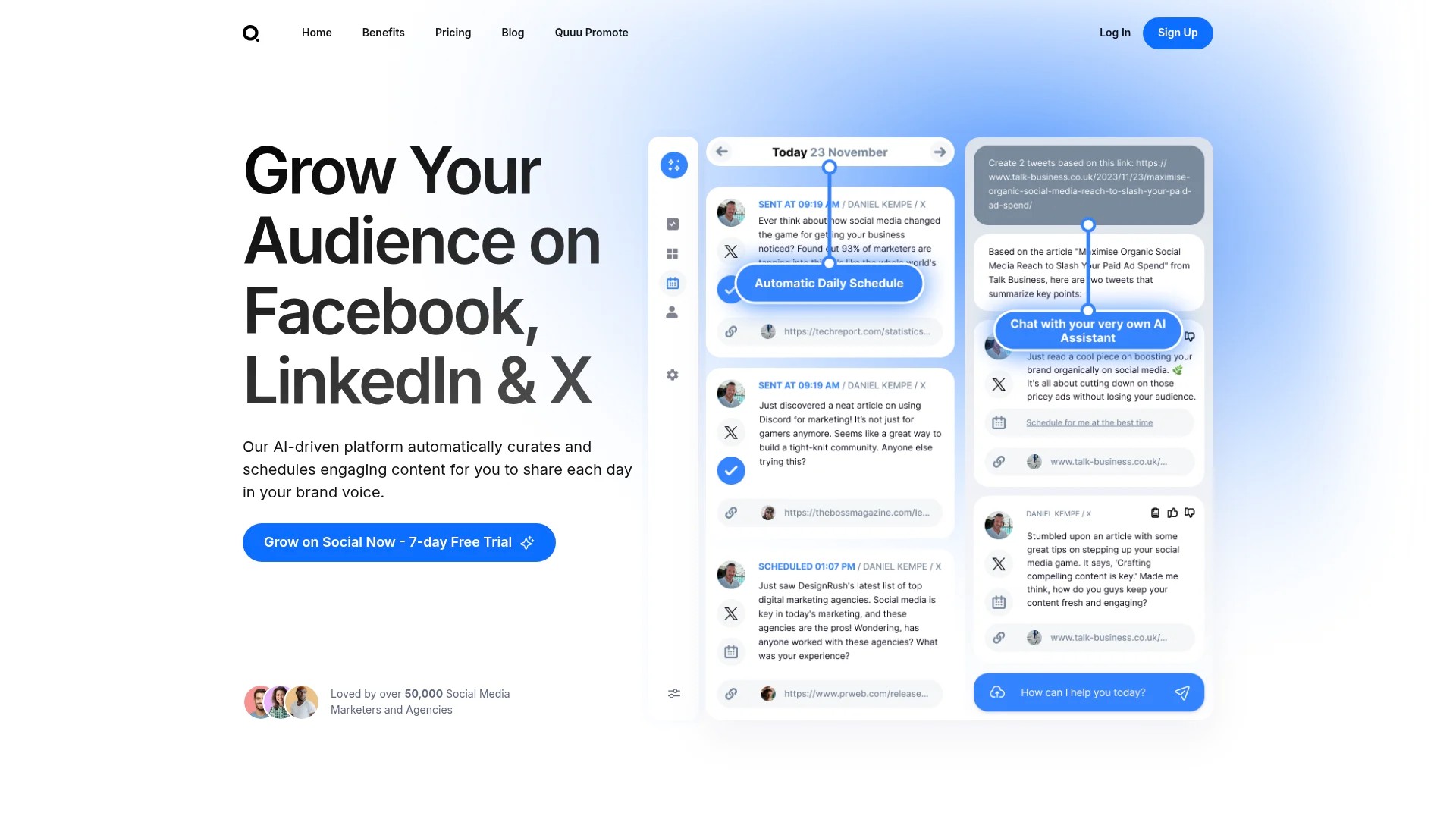
The free trial period lets you test all features before committing to a subscription. No payment details are required during initial registration.
Verify your email address through the confirmation link sent to your inbox. This step activates your account and unlocks the dashboard.
Accessing Your Dashboard
Log in to view your Quuu dashboard. This central hub displays connected social profiles, content suggestions, and scheduling settings.
Navigation menus appear on the left side. Key sections include social profiles, content categories, brand persona settings, and the AI assistant.
Daily email digests arrive showing scheduled posts and new content suggestions. These notifications keep you informed without requiring constant dashboard checks.
The interface organises content by category and posting schedule. Preview upcoming posts in your calendar view to ensure balanced topic distribution.
Connecting Your Social Media Profiles to Quuu
Profile connection establishes the foundation for content automation. Each social network requires separate authentication through secure platform protocols.
Adding Facebook Pages
Navigate to the social profiles section in your dashboard. Select Facebook from the available platform options.
Click the connection button to initiate Facebook’s authorisation process. Log into your Facebook account when prompted.
Grant Quuu permission to post on behalf of your Facebook Page. Select which pages you want to connect if you manage multiple.
Verify the connection shows as active in your Quuu dashboard. Test posts ensure proper integration before enabling automatic posting.
Linking LinkedIn Accounts
Choose LinkedIn from your social profiles menu. The system supports both personal profiles and company pages.
Authenticate through LinkedIn’s secure login portal. Authorise Quuu to publish content on your selected LinkedIn account.
Personal profiles and company pages require separate connections. Connect both if you manage content for your professional brand and business.
LinkedIn posts appear in your scheduling queue alongside other platforms. The system respects LinkedIn’s character limits and formatting requirements.
Integrating Twitter/X Accounts
Select Twitter from the platform connection options. Modern X accounts follow the same integration process.
Authenticate through the Twitter/X login screen. Approve Quuu’s posting permissions for your account.
Multiple Twitter accounts can connect under one Quuu subscription. Separate scheduling windows let you post at different times for each profile.
Verify your Twitter connection appears active. Check that your profile image and account name display correctly in the dashboard.
Building Your Brand Persona for Content Alignment
Brand persona settings shape every piece of content Quuu suggests or generates. These configurations ensure automated posts match your established voice.
Defining Your Brand Voice
Access brand persona settings from your dashboard menu. Describe your brand’s tone using clear descriptors.
Choose between professional, casual, authoritative, friendly, or conversational tones. Combine multiple attributes to capture your unique voice.
Include industry-specific language and terminology your audience expects. Technical audiences appreciate precise jargon whilst general audiences prefer accessible language.
The AI assistant uses these voice parameters when generating original social media content. Consistent tone builds brand recognition across all posts.
Setting Audience Expectations
Define your target audience’s characteristics and preferences. Include their professional roles, interests, and content consumption habits.
Specify pain points your content addresses. This information guides content suggestions towards solving specific audience challenges.
Note preferred content formats like articles, infographics, videos, or case studies. Quuu prioritises suggestions matching your audience’s consumption preferences.
Brand persona customization improves content relevance over time. Regular refinements based on engagement metrics keep suggestions aligned with audience needs.
Selecting Content Categories and Topics
Category selection determines which content suggestions appear in your queue. Strategic topic choices ensure consistent value delivery to your audience.
Choosing Primary Categories
Browse Quuu’s extensive category library from your dashboard. Options span dozens of industries and interest areas.
Select 3-7 primary categories matching your brand focus. More categories provide variety whilst fewer maintain tighter topic alignment.
Marketing professionals might choose digital marketing, social media strategy, and content creation. Tech companies could select software development, cybersecurity, and cloud computing.
Each category delivers daily content suggestions. The system balances suggestions across your selected topics to prevent overloading specific categories.
Refining Topic Preferences
Subcategories offer granular control within broader topics. Marketing breaks into email marketing, SEO, paid advertising, and marketing automation.
Enable or disable specific subcategories based on audience interest. This refinement filters out irrelevant suggestions whilst maintaining category breadth.
Monitor which topics generate highest engagement on your social profiles. Adjust category selections quarterly to reflect changing audience interests.
Content curation improves as Quuu learns your preferences. The system tracks which suggestions you approve or reject to refine future recommendations.
For more detailed guidance on building your content strategy, explore our comprehensive social media content calendar guide.
Configuring Your Posting Mode and Schedule
Posting mode determines how content reaches your social profiles. This critical decision affects your workflow and content approval process.
Understanding Automatic vs Manual Posting
Automatic posting publishes content suggestions directly to your social profiles. Content appears on your schedule without requiring approval for each post.
Manual mode sends content suggestions to your queue for review. You approve, edit, or reject each piece before it goes live.
Most users start with manual mode to build confidence in Quuu’s suggestions. They transition to automatic posting once they trust content quality.
Hybrid approaches work well for different platforms. Set Facebook to automatic whilst keeping LinkedIn manual for professional audience considerations.
Setting Your Scheduling Window
Define when Quuu can publish content on your behalf. Scheduling windows prevent posts appearing during off-hours or inappropriate times.
Specify posting frequency for each connected profile. Options range from once daily to multiple posts per day across different time slots.
Configure timezone settings to match your primary audience location. This ensures posts appear during peak engagement hours for your followers.
Optimal posting times vary by platform. Twitter audiences engage throughout the day whilst LinkedIn performs best during business hours.
Test different scheduling windows for 2-4 weeks. Analyse engagement metrics to identify when your specific audience responds most actively.
| Platform | Recommended Posting Frequency | Optimal Timing Considerations |
|---|---|---|
| Twitter/X | 3-5 times daily | Business hours and early evening |
| 1-2 times daily | Weekday mornings and lunch breaks | |
| 1-3 times daily | Mid-morning and afternoon peaks |
Using Quuu’s AI Assistant for Content Generation
The AI assistant creates original social media posts matching your brand persona. This feature complements curated content with custom messaging.
Generating Brand-Aligned Posts
Access the AI assistant through your dashboard navigation. Describe the topic or message you want to convey in conversational language.
The assistant analyses your brand persona settings and previous posts. It generates content maintaining consistent voice across all communications.
Review generated posts before adding to your schedule. Edit any elements that need adjustment for perfect brand alignment.
AI-generated content appears alongside curated suggestions in your queue. Mix both types to balance third-party authority with original brand messaging.
Refining AI Output
Provide feedback on AI-generated posts through approval ratings. This trains the system to better match your preferences over time.
Save successful post templates for future use. The AI assistant learns from these examples to improve subsequent content generation.
Specify post length, hashtag usage, and call-to-action preferences. These parameters guide the assistant towards your exact requirements.
Learn more about maximising automation efficiency through our 10-step automation guide.
Customising and Editing Content Suggestions
Content editing capabilities ensure every post perfectly represents your brand. Quuu provides tools to modify suggestions before publication.
Reviewing Daily Content Suggestions
Daily email digests showcase new content suggestions matching your categories. Preview articles, headlines, and suggested post copy.
Click through to the original source to verify content quality. Ensure articles provide genuine value to your audience before approving.
Reject suggestions that don’t meet your standards. This feedback helps Quuu refine future recommendations for better alignment.
Queue size indicators show how many approved posts await scheduling. Maintain sufficient queue depth to prevent gaps in your posting schedule.
Editing Post Copy and Formatting
Modify suggested post text to add your brand perspective. Include relevant hashtags or mentions that increase post visibility.
Adjust accompanying images or select different visuals from suggested options. Visual consistency strengthens brand recognition across platforms.
Customise posts for each platform’s unique audience. LinkedIn versions might emphasise professional insights whilst Twitter versions could be more conversational.
Schedule edited posts immediately or add them to your automated queue. Flexibility accommodates both planned content calendars and timely responses.
Monitoring Performance and Optimising Results
Performance tracking reveals which content resonates with your audience. These insights drive continuous improvement in your social media strategy.
Tracking Engagement Metrics
Monitor likes, shares, comments, and click-through rates for each post. These metrics indicate content relevance and audience interest.
Compare performance across different content categories. Identify which topics generate strongest engagement for future category adjustments.
Track follower growth correlated with posting consistency. Automated scheduling maintains presence that attracts and retains audiences.
Platform-specific analytics show how content performs differently across Facebook, LinkedIn, and Twitter. Tailor content strategies to each platform’s unique dynamics.
Adjusting Your Content Strategy
Review performance data monthly to identify patterns. High-performing content types should influence category and topic selections.

Experiment with posting frequency adjustments. Increase post volume on platforms showing strong engagement whilst reducing frequency on underperforming channels.
Test different scheduling windows based on engagement timing. Shift posts earlier or later to capture peak audience activity periods.
Refine brand persona settings as you learn what resonates. Continuous optimisation keeps automated content aligned with audience preferences.
Understand the strategic advantages by reading about automating social media posts for brand growth.
Understanding Quuu’s Pricing and Plan Options
Quuu offers flexible subscription plans matching different user needs. Understanding plan features helps you select the right option.
The Pro plan provides access to 10 social profiles at $5 per month, making it accessible for small businesses and solo marketers. This entry-level option includes full content curation and scheduling features.
Higher-tier plans accommodate agencies and enterprises managing multiple client accounts. These packages increase profile limits whilst adding team collaboration features.
Annual billing delivers discounts compared to monthly subscriptions. The savings often cover one to two months of service over yearly commitments.
Free trials let you test all features before purchasing. Evaluate content quality, user interface, and time savings during your trial period.
| Plan Feature | Best For | Key Benefit |
|---|---|---|
| 10 Profile Limit | Small businesses and solopreneurs | Manage multiple brands affordably |
| Unlimited Suggestions | Content-hungry marketers | Never run out of quality content |
| AI Assistant Access | Brands needing original content | Generate custom posts instantly |
Advanced Features and Workflow Integration
Quuu integrates with broader content marketing workflows. These advanced capabilities extend automation beyond basic scheduling.
Blog Feed and RSS Integration
Connect your blog’s RSS feed to automatically share new articles. This feature promotes original content without manual posting.
Configure sharing frequency to avoid overwhelming your social profiles with blog updates. Balance original content promotion with curated third-party articles.
Customise how blog posts appear on different platforms. Add platform-specific copy or hashtags to optimise each shared article.
Cross-Platform Publishing Strategy
Develop unified content themes across Facebook, LinkedIn, and Twitter whilst respecting each platform’s culture. Quuu maintains consistent messaging with platform-appropriate formatting.
Stagger identical content across platforms to maximise reach without appearing repetitive. Post the same article to LinkedIn in the morning and Facebook in the afternoon.
Track which platforms drive most engagement for specific content types. Allocate more automation resources to your highest-performing channels.
Compare Quuu’s capabilities with other solutions through our automation tool selection guide.
Troubleshooting Common Setup Issues
Most setup challenges resolve quickly with targeted solutions. These common scenarios affect new Quuu users frequently.
Profile Connection Problems
Disconnected profiles usually stem from expired authentication tokens. Reconnect the affected platform through your social profiles dashboard.
Browser cookie restrictions sometimes block authentication flows. Use a different browser or disable tracking prevention temporarily during connection.
Multiple account conflicts occur when switching between personal and business profiles. Log out completely from the social platform before reconnecting through Quuu.
Content Not Appearing as Expected
Empty queues indicate category selections might be too narrow. Broaden your topic choices to increase suggestion volume.
Posts appearing at wrong times suggest timezone misconfiguration. Verify your scheduling window timezone matches your target audience location.
Low-quality suggestions improve as you provide feedback. Consistently reject irrelevant content to train Quuu’s recommendation algorithm.
Quick Answers to Common Questions
How does Quuu work?
Quuu operates through content discovery and automated promotion. The platform provides pre-vetted articles, blog posts, and visual content tailored to chosen topics. Through Quuu Promote specifically, the tool automates social media shares by connecting your content with real influencers and content curators.
Can I integrate Quuu with other scheduling tools?
Quuu works alongside complementary tools in your marketing stack. For example, you can use Buffer’s social media calendar with Quuu for enhanced scheduling flexibility. This combination leverages Quuu’s curation strength with Buffer’s advanced scheduling features.
What happens if I want to change posting modes later?
Switch between automatic and manual posting anytime through your dashboard settings. Changes take effect immediately without disrupting your existing queue. Many users adjust modes seasonally based on workload and content needs.
Your Automated Social Media Presence Starts Now
Quuu Automate eliminates the daily burden of content curation and scheduling. Your social profiles maintain consistent activity whilst you focus on strategy, engagement, and business growth.
Start with manual posting mode to build confidence in content suggestions. Connect your most important social profile first and expand gradually as you master the system.
Refine your brand persona and category selections over the first month. Performance data reveals what resonates with your specific audience, informing better automation decisions.
The time saved through automation compounds weekly. Hours previously spent searching for content and scheduling posts now fuel higher-value marketing activities.
Your free trial provides full access to test every feature. Experience how automated social media content maintains your online presence effortlessly whilst delivering genuine audience value.